Color Picker Bookmarklet

Grab this simple code to create an in-browser (Chrome) color picker
What's a Color Picker?
Per Wikipedia, a color picker (also color chooser or color tool) is a graphical user interface widget, usually found within graphics software or online, used to select colors and, in some cases, to create color schemes (the color picker might be more sophisticated than the palette included with the program).
Color Picker Bookmarklet
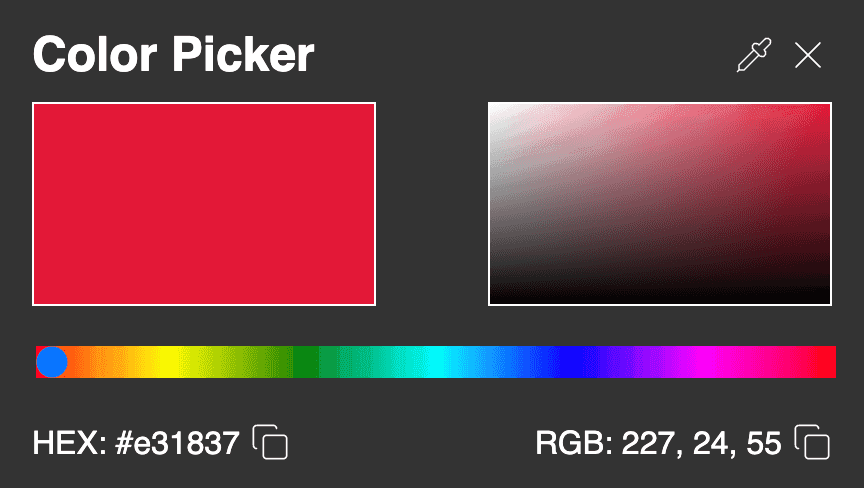
Color Picker Features
| Features | Description |
|---|---|
| Active Color Representation | See the active color, boldly represented |
| Active Color Refinement | Work with a refined color spectrum around the Active Color; fading to white and fading to black |
| Full color spectrum | Work across all primary colors with an easy to use slider to switch the active color |
| Hex & RGB support | See, copy and paste the hexadecimal and red/green/blue definitions of the active color |
| Color picker | Use the color picker pipette to select any color on your screen and across your desktop |
| Incredible UX | Setup is blisteringly fast - simply create a bookmark in Chrome! |
Dependencies
- This snippet is currently functional and tested in versions of Chrome v128 and onwards
- If you want to try it in other browsers or versions please do - and let me know how it goes. I'll update the supported browsers and versions for the benefit of others
Install the Color Picker
| Step | Description |
|---|---|
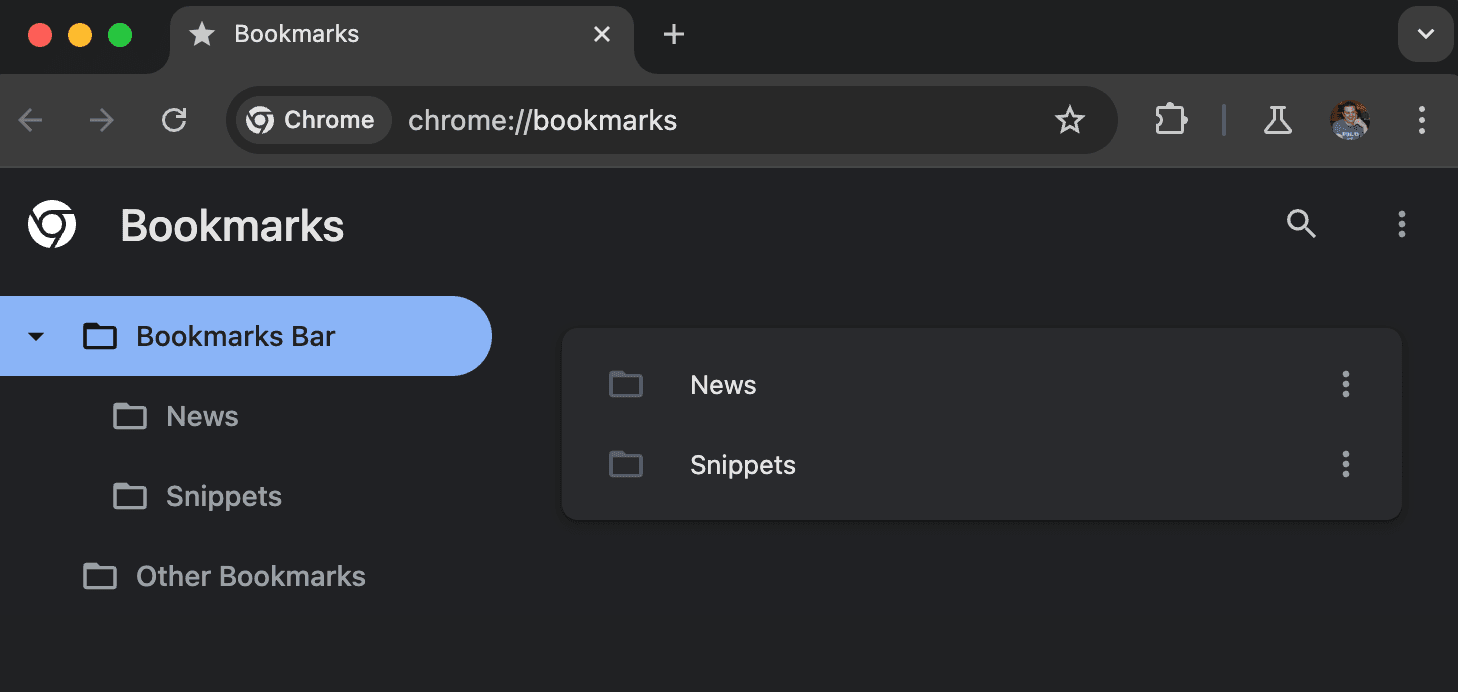 |
Open Chrome's Bookmark manager in one of the following ways: Enter chrome://bookmarks in the address field OR click on Bookmarks and then choose Bookmark Manager in the menubar. You should see something like the image on the left. |
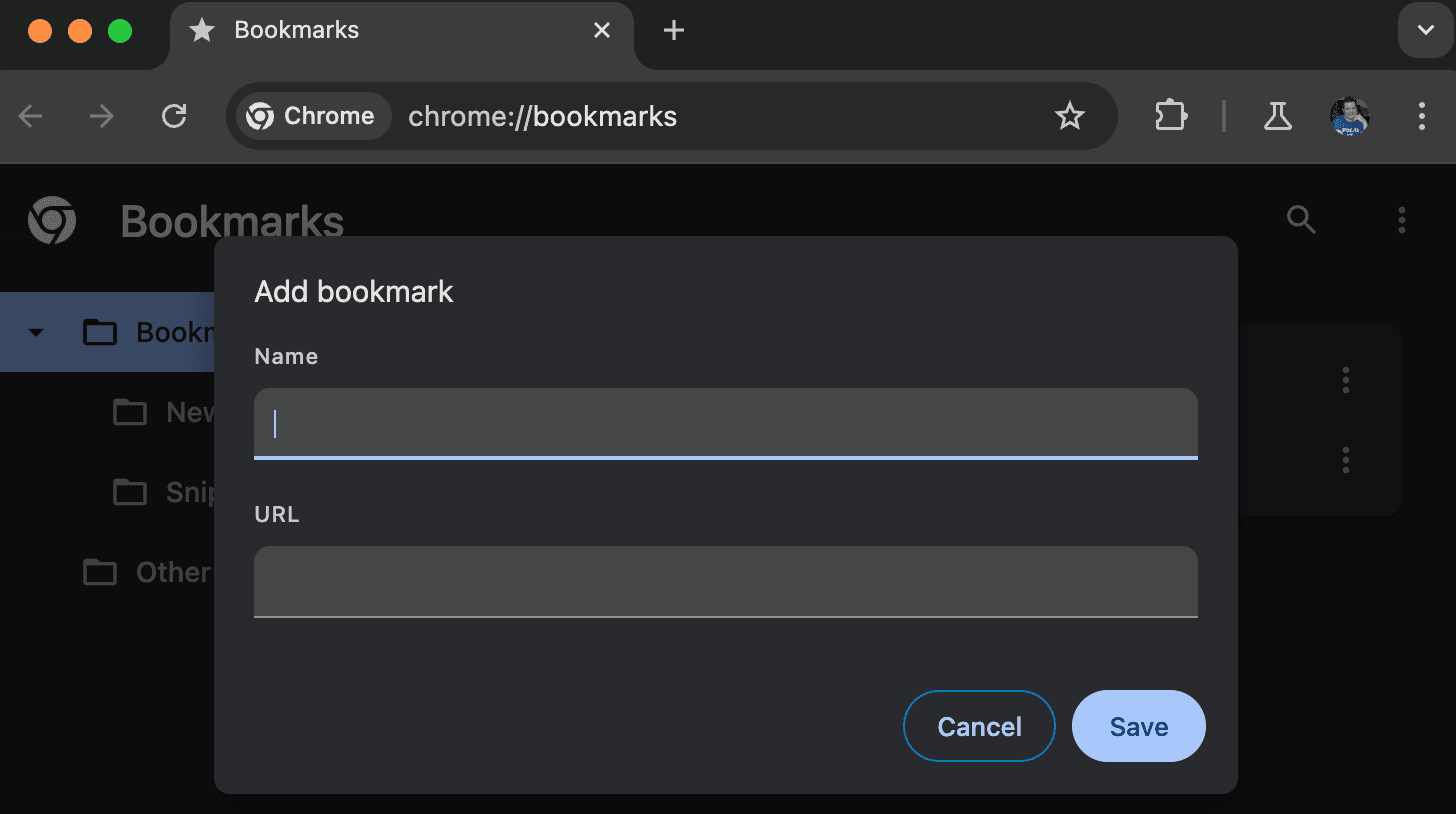 |
Click on the three dots in the top right of the screen and then click Add new Bookmark |
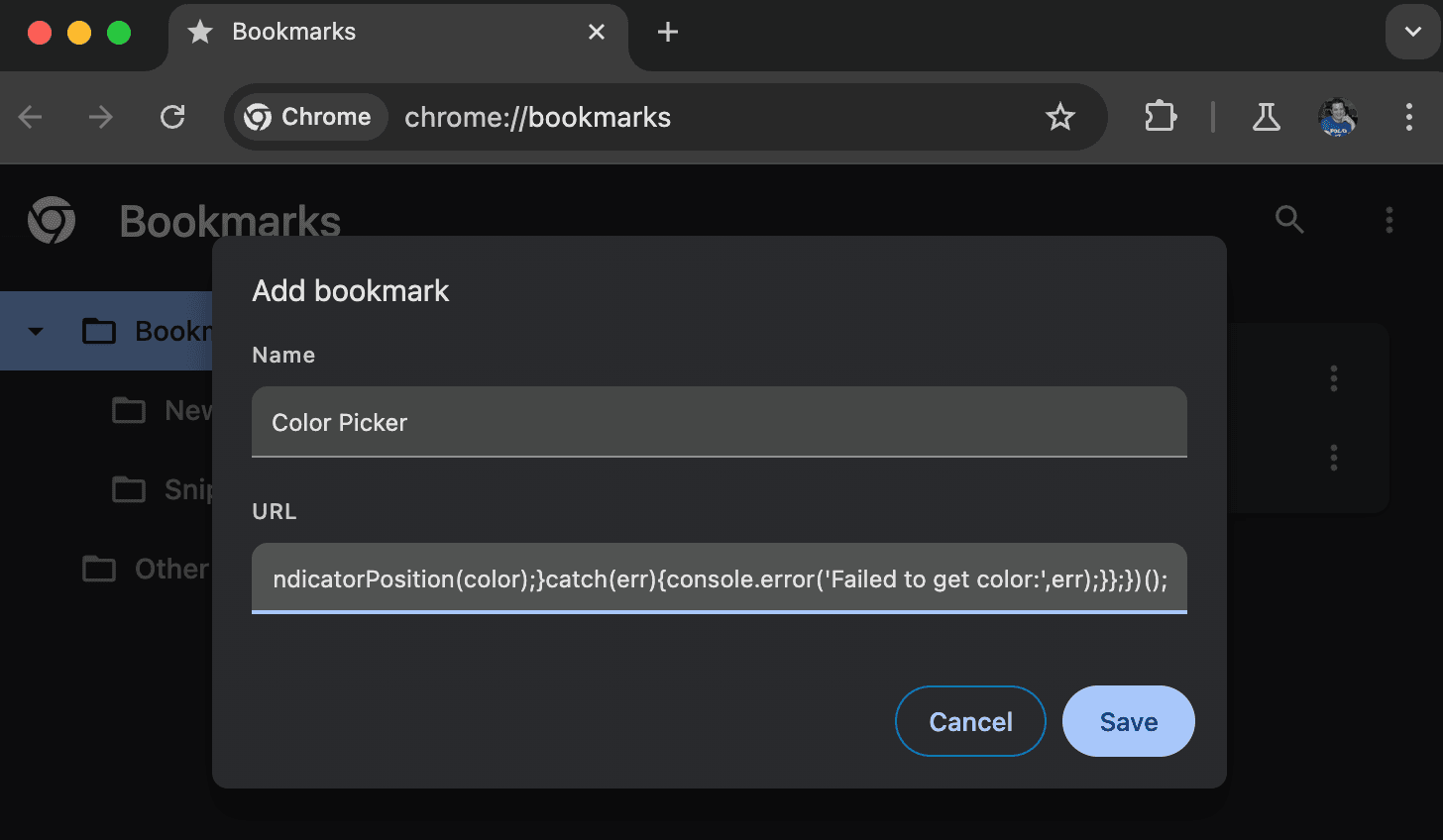 |
Enter Color Picker in the Name field. Then click on Copy Code above the code section below this table and paste it into the URL box in the new bookmark window. Click Save to finish creating the bookmark. |
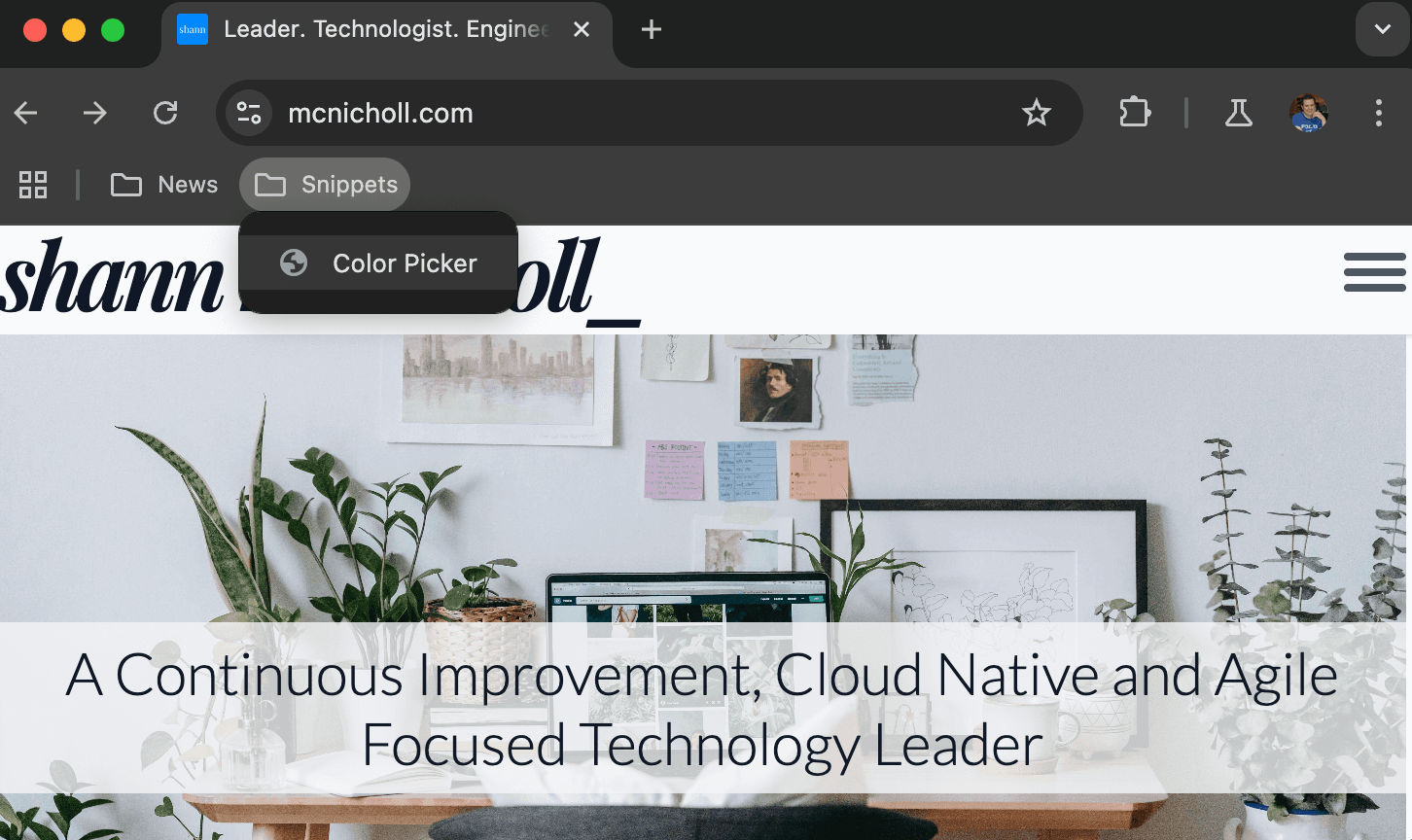 |
Now that you have a new Color Picker bookmark it's time to use it. The new bookmark should appear in the Bookmarks Bar underneath the address bar, as shown. Click on it to open the Color Picker. |
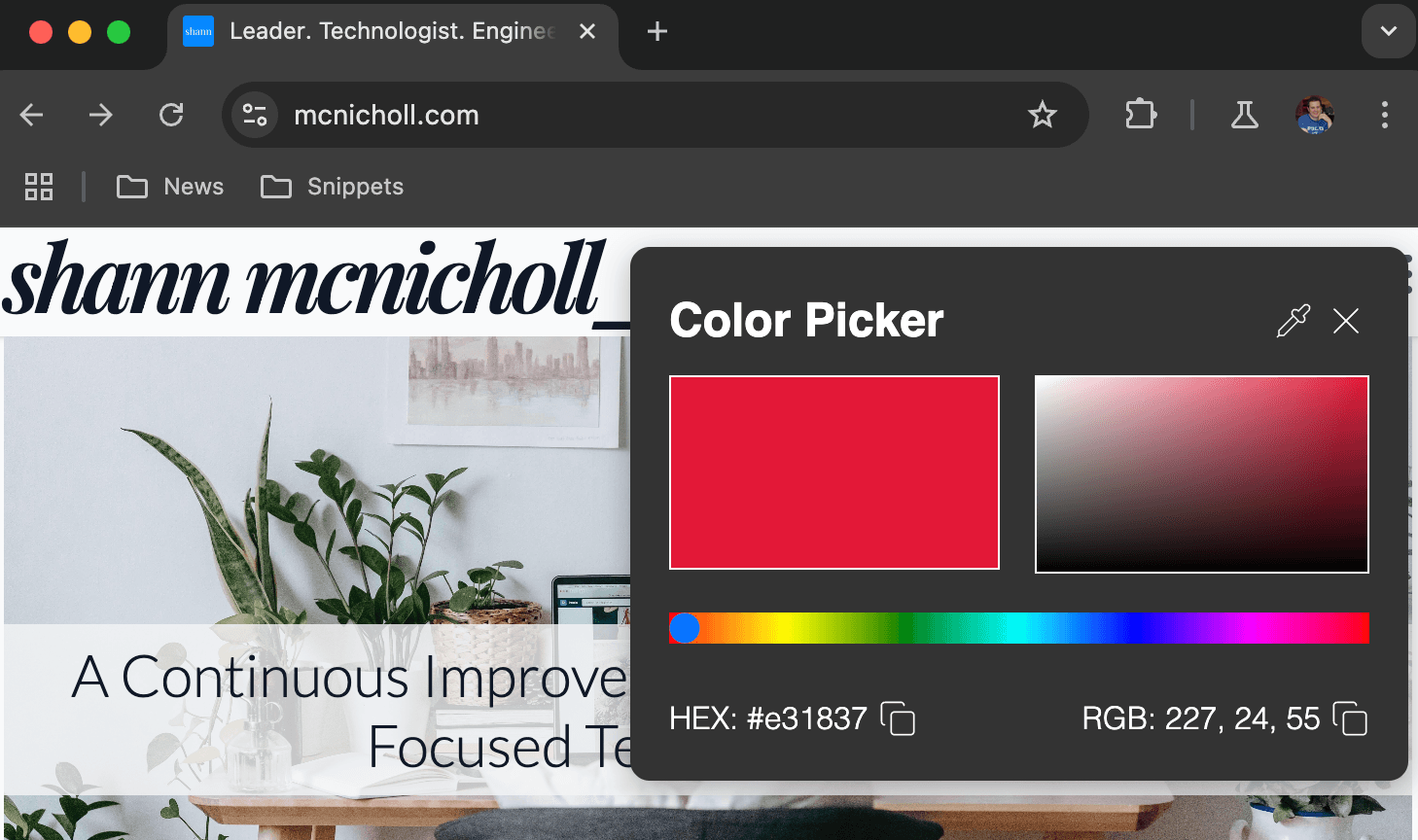 |
You should now see the Color Picker in all of it's glory. |
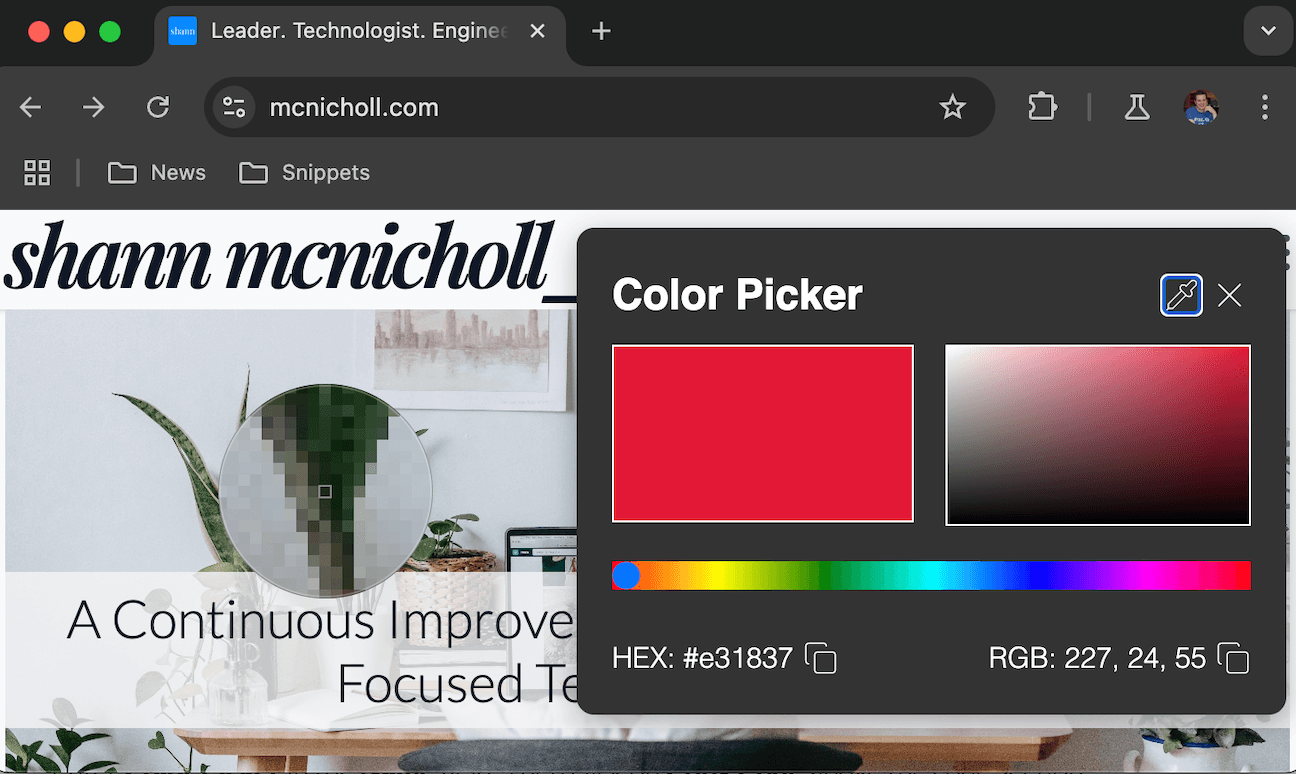 |
Click on the water dropper / pipette icon in the top right to choose any color on your screen |
jsjavascript:(function(){const svgIcons={copy:'<svg xmlns="http://www.w3.org/2000/svg" width="20" height="20" viewBox="0 0 24 24" fill="none" stroke="currentColor" stroke-width="1" stroke-linecap="round" stroke-linejoin="round"><rect width="14" height="14" x="8" y="8" rx="2" ry="2"/><path d="M4 16c-1.1 0-2-.9-2-2V4c0-1.1.9-2 2-2h10c1.1 0 2 .9 2 2"/></svg>',pipette:'<svg xmlns="http://www.w3.org/2000/svg" width="20" height="20" viewBox="0 0 24 24" fill="none" stroke="currentColor" stroke-width="1" stroke-linecap="round" stroke-linejoin="round" class="lucide lucide-pipette"><path d="m2 22 1-1h3l9-9"/><path d="M3 21v-3l9-9"/><path d="m15 6 3.4-3.4a2.1 2.1 0 1 1 3 3L18 9l.4.4a2.1 2.1 0 1 1-3 3l-3.8-3.8a2.1 2.1 0 1 1 3-3l.4.4Z"/></svg>',x:'<svg xmlns="http://www.w3.org/2000/svg" width="24" height="24" viewBox="0 0 24 24" fill="none" stroke="currentColor" stroke-width="1" stroke-linecap="round" stroke-linejoin="round"><path d="M18 6 6 18"/><path d="m6 6 12 12"/></svg>'};let existingPicker=document.getElementById('color-picker-container');if(existingPicker){existingPicker.remove();}let picker=document.createElement('div');picker.id='color-picker-container';picker.style='position:fixed;top:10px;right:10px;padding:20px;background:#333;color:white;border-radius:10px;box-shadow:0px 4px 16px rgba(0,0,0,0.3);z-index:100000;width:400px;height:auto;font-family:sans-serif;';let titleBar=document.createElement('div');titleBar.innerHTML='<strong style="color: white; font-size: 24px;">Color Picker</strong>';titleBar.style='display: flex; justify-content: space-between; align-items: center; color: white; padding-bottom: 10px;';let currentColorDisplay=document.createElement('div');currentColorDisplay.style='width: 170px; height: 100px; background-color: #e31837; border: 1px solid white; float: left;';let gradientDisplay=document.createElement('canvas');gradientDisplay.width=170;gradientDisplay.height=100;gradientDisplay.style='border: 1px solid white; float: right; cursor: crosshair; position: relative;';let gradientCtx=gradientDisplay.getContext('2d');let indicator=document.createElement('div');indicator.style='width: 10px; height: 10px; border-radius: 50%; border: 2px solid white; position: absolute; background: rgba(0,0,0,0); pointer-events: none;';gradientDisplay.style.position='relative';gradientDisplay.appendChild(indicator);let clearDiv=document.createElement('div');clearDiv.style='clear: both;';let colorSlider=document.createElement('input');colorSlider.type='range';colorSlider.min=0;colorSlider.max=360;colorSlider.value=0;colorSlider.style='width: 100%; margin-top: 20px; background: linear-gradient(to right, red, yellow, green, cyan, blue, magenta, red); appearance: none;';let colorInfo=document.createElement('div');colorInfo.style='color: white; font-size: 16px; padding-top: 20px; display: flex; justify-content: space-between;';let hexDisplay=document.createElement('div');hexDisplay.innerHTML='HEX: <span id="hexValue">#e31837</span>';let hexCopy=document.createElement('button');hexCopy.innerHTML=svgIcons.copy;hexCopy.style='border:none;background:none;color:white;cursor:pointer;padding:0;margin:0 0 0 5px;';let rgbDisplay=document.createElement('div');rgbDisplay.innerHTML='RGB: <span id="rgbValue">227, 24, 55</span>';let rgbCopy=document.createElement('button');rgbCopy.innerHTML=svgIcons.copy;rgbCopy.style='border:none;background:none;color:white;cursor:pointer;padding:0;margin:0 0 0 5px;';let hexContainer=document.createElement('div');let rgbContainer=document.createElement('div');hexContainer.style='display: flex; align-items: center;';rgbContainer.style='display: flex; align-items: center;';hexContainer.appendChild(hexDisplay);hexContainer.appendChild(hexCopy);rgbContainer.appendChild(rgbDisplay);rgbContainer.appendChild(rgbCopy);colorInfo.appendChild(hexContainer);colorInfo.appendChild(rgbContainer);let eyeDropperButton=document.createElement('button');eyeDropperButton.innerHTML=svgIcons.pipette;eyeDropperButton.title='Pick a color from the screen';eyeDropperButton.style='border:none;background:none;color:white;cursor:pointer;padding:0;margin:0 5px;';let closeButton=document.createElement('button');closeButton.innerHTML=svgIcons.x;closeButton.style='border:none;background:none;color:white;cursor:pointer;padding:0;margin:0;';let buttonContainer=document.createElement('div');buttonContainer.style='display: flex; align-items: center;';buttonContainer.appendChild(eyeDropperButton);buttonContainer.appendChild(closeButton);titleBar.appendChild(buttonContainer);picker.appendChild(titleBar);picker.appendChild(currentColorDisplay);picker.appendChild(gradientDisplay);picker.appendChild(clearDiv);picker.appendChild(colorSlider);picker.appendChild(colorInfo);document.body.appendChild(picker);function updateCurrentColorDisplay(color){currentColorDisplay.style.backgroundColor=color;document.getElementById('hexValue').innerText=color;let rgb=hexToRgb(color);document.getElementById('rgbValue').innerText=`${rgb.r}, ${rgb.g}, ${rgb.b}`;}function updateGradientDisplay(primaryColor){const width=gradientDisplay.width;const height=gradientDisplay.height;const gradientX=gradientCtx.createLinearGradient(0,0,width,0);gradientX.addColorStop(0,'white');gradientX.addColorStop(1,primaryColor);gradientCtx.fillStyle=gradientX;gradientCtx.fillRect(0,0,width,height);const gradientY=gradientCtx.createLinearGradient(0,0,0,height);gradientY.addColorStop(0,'rgba(0,0,0,0)');gradientY.addColorStop(1,'black');gradientCtx.fillStyle=gradientY;gradientCtx.fillRect(0,0,width,height);}function updateSliderWithPickedColor(hex){let hsl=hexToHSL(hex);colorSlider.value=hsl.h;colorSlider.style.background='linear-gradient(to right, red, yellow, green, cyan, blue, magenta, red)';}function hsvToRgb(h,s,v){let f=(n,k=(n+h/60)%6)=>v-v*s*Math.max(Math.min(k,4-k,1),0);return `rgb(${Math.round(f(5)*255)}, ${Math.round(f(3)*255)}, ${Math.round(f(1)*255)})`;}function rgbToHex(r,g,b){return `#${((1<<24)+(parseInt(r)<<16)+(parseInt(g)<<8)+parseInt(b)).toString(16).slice(1).toUpperCase()}`;}function hexToRgb(hex){let bigint=parseInt(hex.slice(1),16);let r=(bigint>>16)&255;let g=(bigint>>8)&255;let b=bigint&255;return{r,g,b};}function hexToHSL(hex){let rgb=hexToRgb(hex);r=rgb.r/255;g=rgb.g/255;b=rgb.b/255;let max=Math.max(r,g,b),min=Math.min(r,g,b);let h,s,l=(max+min)/2;if(max==min){h=s=0;}else{let d=max-min;s=l>0.5?d/(2-max-min):d/(max+min);switch(max){case r:h=(g-b)/d+(g<b?6:0);break;case g:h=(b-r)/d+2;break;case b:h=(r-g)/d+4;break;}h/=6;}return{h:Math.round(h*360),s:s,l:l};}function updateIndicatorPosition(color){let rgb=hexToRgb(color);let width=gradientDisplay.width;let height=gradientDisplay.height;let x=(rgb.r/255)*width;let y=(1-(rgb.b/255))*height;indicator.style.left=`${x}px`;indicator.style.top=`${y}px`;indicator.style.visibility='visible';}updateCurrentColorDisplay('#e31837');updateGradientDisplay('#e31837');colorSlider.addEventListener('input',function(){let color=hsvToRgb(this.value,1,1);updateCurrentColorDisplay(rgbToHex(...color.match(/\d+/g)));updateGradientDisplay(color);updateIndicatorPosition(rgbToHex(...color.match(/\d+/g)));});let isDragging=false;gradientDisplay.addEventListener('mousedown',function(event){isDragging=true;updateColorFromGradient(event);});gradientDisplay.addEventListener('mousemove',function(event){if(isDragging){updateColorFromGradient(event);}});document.addEventListener('mouseup',function(){isDragging=false;});function updateColorFromGradient(event){let rect=gradientDisplay.getBoundingClientRect();let x=Math.max(0,Math.min(event.clientX-rect.left,rect.width-1));let y=Math.max(0,Math.min(event.clientY-rect.top,rect.height-1));let imageData=gradientCtx.getImageData(x,y,1,1).data;let hexColor=rgbToHex(imageData[0],imageData[1],imageData[2]);updateCurrentColorDisplay(hexColor);indicator.style.left=(x-5)+'px';indicator.style.top=(y-5)+'px';indicator.style.visibility='visible';}closeButton.onclick=function(){picker.remove();};hexCopy.onclick=function(){const hexValue=document.getElementById('hexValue').innerText;navigator.clipboard.writeText(hexValue).then(()=>{hexCopy.style.color='#4CAF50';setTimeout(()=>hexCopy.style.color='white',1000);}).catch(err=>console.error('Failed to copy hex value:',err));};rgbCopy.onclick=function(){const rgbValue=document.getElementById('rgbValue').innerText;navigator.clipboard.writeText(rgbValue).then(()=>{rgbCopy.style.color='#4CAF50';setTimeout(()=>rgbCopy.style.color='white',1000);}).catch(err=>console.error('Failed to copy RGB value:',err));};eyeDropperButton.onclick=async function(){if(!window.EyeDropper){alert('Your browser does not support the EyeDropper API');return;}try{const eyeDropper=new EyeDropper();const result=await eyeDropper.open();const color=result.sRGBHex;updateCurrentColorDisplay(color);updateGradientDisplay(color);updateSliderWithPickedColor(color);updateIndicatorPosition(color);}catch(err){console.error('Failed to get color:',err);}};})();